 BACK 40
- Turn on Wholesale under Add-ons, then open Wholesale.
- Set prices: enter a wholesale price (and a minimum, like 5 lb) for each of your products you sell wholesale. Items without a price stay off the list. Vendors' consignment items can't be sold wholesale.
- Add buyers: the business, a contact, email and how many days they have to pay (30 by default; 0 means on delivery). Each buyer gets a private ordering link: copy it and send it to them.
- Buyers open their link, enter quantities and a delivery date, and send the order. It appears under Orders to fill (and as an alert). Took an order by phone? Use Take an order yourself.
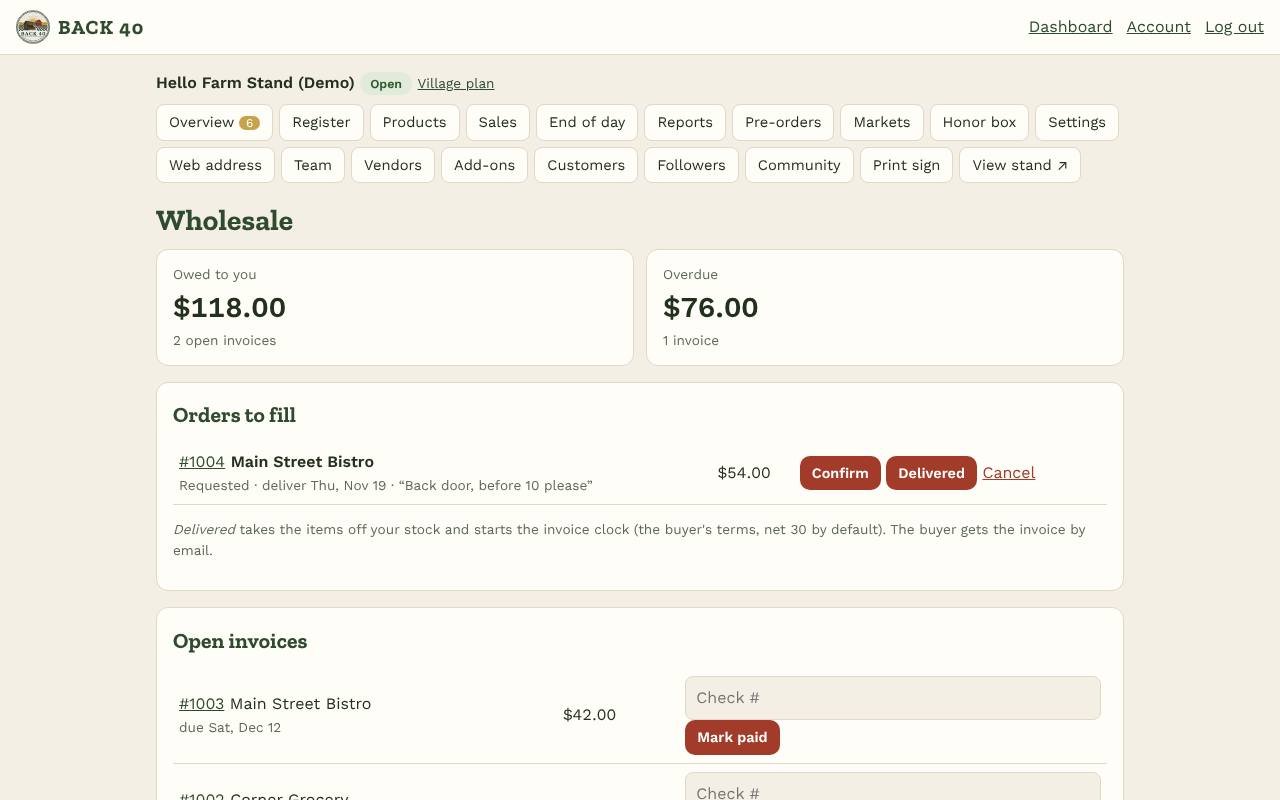
- Confirm it, then tap Delivered when you drop it off: the items come off your stock and the invoice is emailed to the buyer, due in their terms. Print the invoice anytime from its number.
- Open invoices shows what's owed, with overdue ones marked. Tap Mark paid (with a check number) when the money comes in. Buyers see their orders and invoices on their ordering page.
- With Bookkeeping on, delivered wholesale counts in your sales and its product cost in your cost of goods. Wholesale is owner-only.
Wholesale
Sell to restaurants and stores with price lists and net-30 invoices.
Screenshots
Related guides
- Add-ons: Books, Marketing kit, LoyaltyBookkeeping, posts and flyers, punch cards and gift cards.
- CSAShares, pickup sites, holds and swaps, installment payments.
- Meat ordersHalves and quarters with deposits, cut sheets and bills by hanging weight.
- U-pick & eventsTime slots, tickets and gate check-in for u-pick days and workshops.
Still stuck? Send us a message.
Be one of the first stands on Back40.
Leave your email and we'll let you know as soon as your spot is ready.