BACK 40
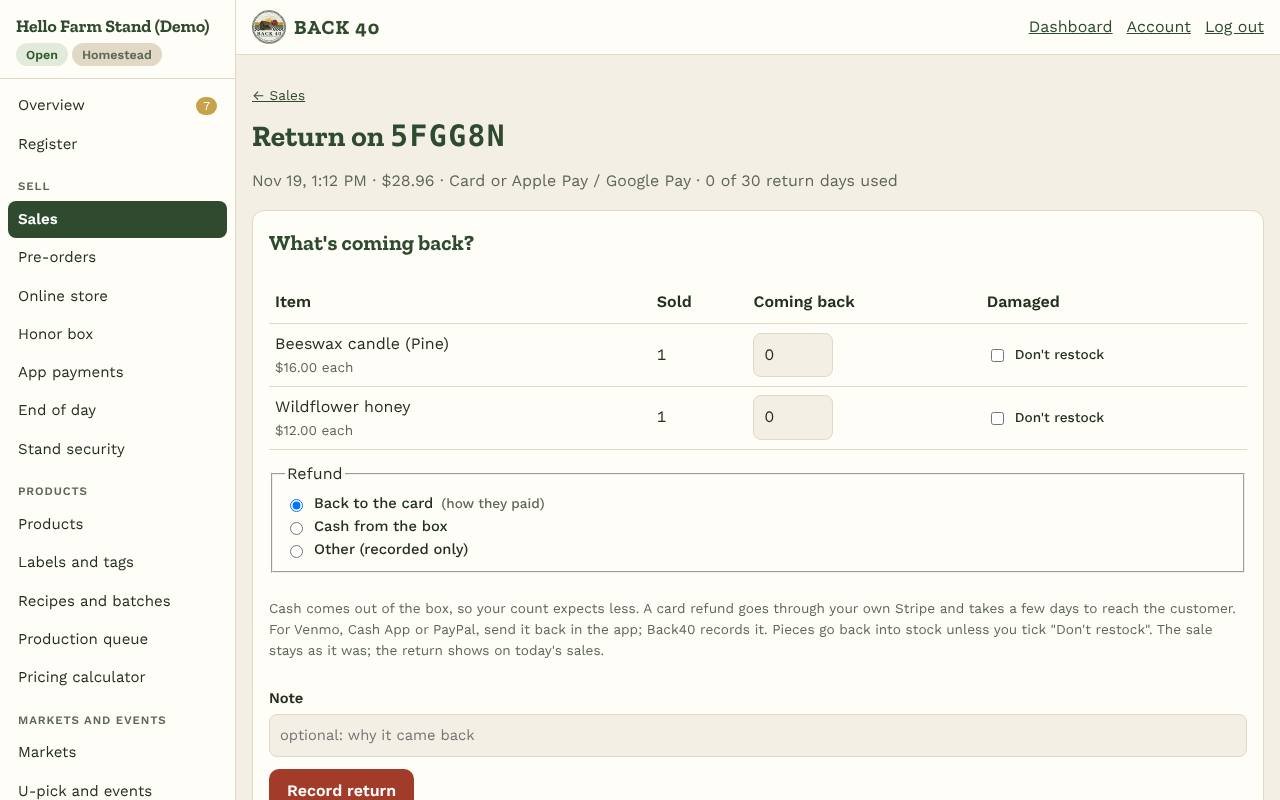
When a customer brings something back, record it against their sale. Open Sell → Sales, find the sale, and tap Return items.
- Choose what's coming back and how many. Weighed items come back whole. Tick Don't restock for anything damaged; everything else goes back into stock.
- Choose the refund. Back40 suggests the way they paid:
- Cash comes out of the honor box or drawer, so your next count expects less.
- Card is refunded through your own Stripe account (Back40 never holds the money). It takes a few days to reach the customer's card.
- Venmo, Cash App or PayPal: send it back in the app yourself; Back40 records it as refunded by you.
- Store credit goes on the customer's account, if you offer change credit and the sale had an account.
- Record return. The return shows in today's sales, end of day, reports and your vendors' statements as money going back; the original sale stays as it was. If the customer gave an email, they get a return receipt.
In Settings → Stand and payments → Returns, set how many days after a sale you take returns (30 by default; 0 for no limit), and whether staff can do returns too. Owners always can.