 BACK 40
- Sign up as a processor. Under Settings set the days you take animals, your inspection (custom exempt, state or USDA, with your establishment number), and per species the most head a day, the kill fee and the cut-and-wrap price per hanging pound.
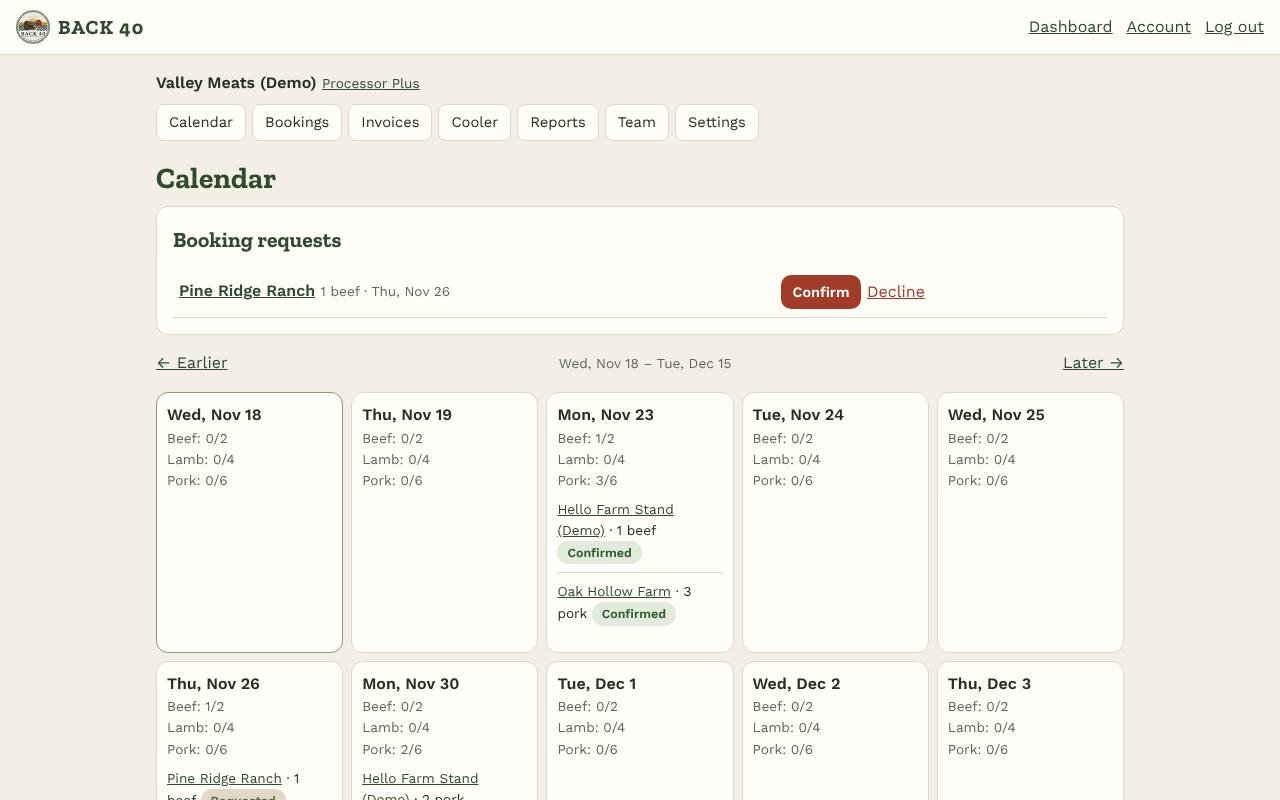
- Farms book you from their Meat orders page (with the Meat & bulk orders add-on): the date, how many head, and whether processing is billed to the farm or to each buyer (custom exempt). Requests show at the top of your calendar; confirm (or move the date) or decline. The farm is told, and its offering shows your name and date.
- Cut sheets from the farm's customers are on the booking, ready to print. When the animals arrive tap Animals are in: that locks the cut sheets.
- Hanging weights: enter each carcass (and tag) and each customer's share. They go straight onto the farm's bill for that customer.
- Ready for pickup: the farm is told; on Pro its customers are emailed with their bill and your address. Then mark it picked up.
- Pro ($39/mo): daily limits on the calendar, bookings by phone for anyone, processing invoices (add extras like smoking or sausage, mark paid, email them), printable package labels (custom-exempt labels say NOT FOR SALE; inspected ones show your inspection and establishment number), and Set up my retail counter: a Back40 stand of your own with the register, products and reports, included while you're on Pro.
- Plus ($79/mo): more locations, a cooler list with hold dates, and a yearly report of head, hanging pounds and invoices. Everything is free during early access.
Help center › Organizers and processors
Processors
Bookings and cut sheets from farms, weights, invoices, labels.
Screenshots
Related guides
- Market organizersRun a market: booth map, applications, fees, messages and totals.
Still stuck? Send us a message.
Be one of the first stands on Back40.
Leave your email and we'll let you know as soon as your spot is ready.